
Core
The Commerce Stack Explained: ERP, PIM, OMS, WMS and Who Owns What
Stephan Spijkers · 2026-10-18 · 15 min read
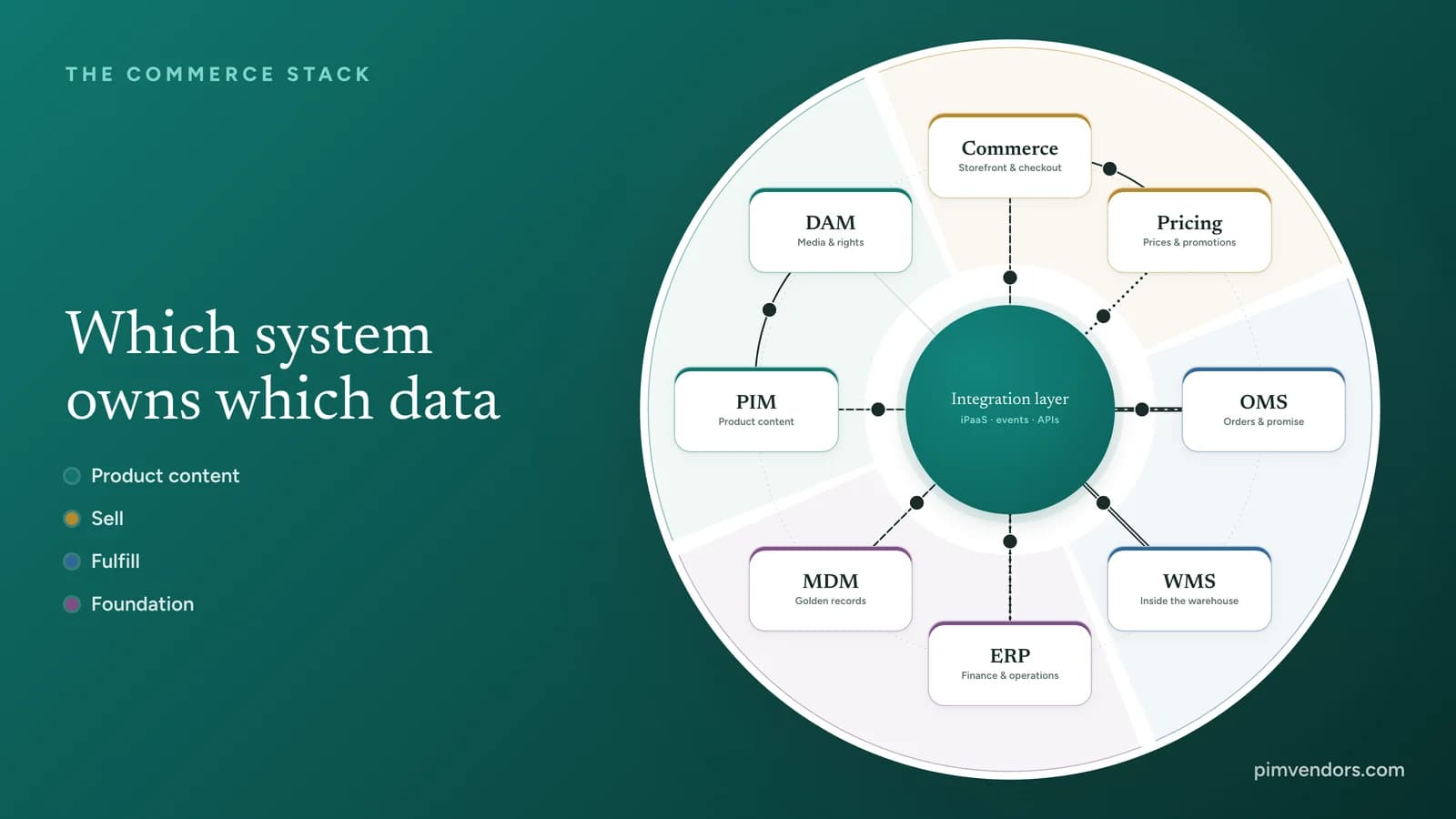
A webshop, an app, a B2B portal, a marketplace listing and the till in a store should all show the same product, the same price and the same stock. Behind them sits a set of systems that each do one part of the job: an ERP for the books, a PIM for the product content, an OMS for the orders, and several more. This guide maps that commerce stack. It shows which system owns which data, how the data moves between them and where the lines between them belong. Start with the interactive map, then read on for the detail.
The commerce stack on one map
Interactive map
The commerce stack explorer
Select a system to see what it owns, what it gets and sends, and what is not its job.
Product content
Sell
Fulfill
Foundation
Product information management
PIM
Turns an item number into a product that sells: descriptions, specifications, taxonomy, translations, relations such as variants and accessories, and a completeness check before anything goes live.
System of record for
- Marketing copy and specifications
- Categories and search attributes
- Translations and channel versions
- Product relations and completeness
Gets
- Item identity from the ERP or the MDM
- Asset links from the DAM
- Product data from suppliers
Sends
- Published product content to the storefront, marketplaces, print and AI channels
Not its job: Stock, prices and orders. A PIM may show them, but it does not own them.
Read the PIM guideThe map shows eight systems in four colored groups around one integration layer: product content, selling, fulfillment and the foundation underneath. Lines that pass through the middle are asynchronous: events, iPaaS flows and batches all go through the integration layer. Lines that arc straight from one system to another are direct API calls, used when a buyer is waiting for the answer. The same map comes back further down, once to show who owns each piece of data and once to play the journeys through the stack.
Systems of record and systems of engagement
Two kinds of systems share the stack. A system of record is the authority for a piece of data: the only place where it may be created or changed. A system of engagement is where customers and staff work: the storefront, the app, the B2B portal, the point of sale. Systems of engagement read prepared data from the systems of record and send back what the buyer did.
The rule that keeps a stack healthy is short: one owner for every piece of data. When the same field can be edited in two systems, the two copies drift apart. A description fixed in the webshop is overwritten by the next import. A contract price differs between the portal and the invoice. Stock shown as available was sold an hour ago in a store. Each of these is a data ownership problem before it is a software problem.
The eight systems and what each owns
ERP: the financial and operational record
The ERP (enterprise resource planning) is the legal and financial backbone. It creates the item number, links the bill of materials, holds standard costs and list prices, runs purchasing and books every sale in the general ledger. It decides whether an item is active, can be bought and can be sold. What it is not built for is customer-facing content: its database is designed for accounting accuracy, not for rich attributes, inheritance and translations. Where ERP stops and PIM starts covers that boundary in depth.
MDM: one identity for every customer, supplier and product
MDM (master data management) keeps one trusted record, the golden record, for the entities the whole company shares: customers, suppliers, locations, account hierarchies and product identity. It matches and merges duplicates from procurement systems, regional databases and partner feeds. It matters most in companies that run several ERPs, often after a merger, where the same supplier or product exists under different codes. Read the principles of master data management for how an MDM program starts.
PIM: product content that sells
The PIM (product information management) takes the item number and base units from the ERP or MDM and turns them into a product that sells: descriptions, specifications, categories, search attributes, translations, compliance documents and relations such as variants, accessories, spare parts and kits. Completeness rules and review workflows hold a product back until it is ready for each channel. Then the PIM publishes it. What is PIM explains how a PIM works.
DAM: the files and the rights to use them
The DAM (digital asset management) is the library for photos, video, 3D models, technical drawings and manuals. It reads the metadata of every file, tracks usage rights and expiry dates, and creates the right size and format for every screen, delivered through a content delivery network. The PIM stores the link, the DAM stores the file. DAM and PIM explains how the two connect.
The commerce platform: where the buyer acts
The commerce platform, often headless with its own front end, is the main system of engagement. It runs sessions, accounts, search and navigation, the cart, quote requests and checkout. It reads product content from the PIM and the DAM, asks the pricing engine for prices and the OMS for stock, and hands every completed order to the OMS. Headless and composable commerce explains how the front end and the back end separate.
The pricing and promotion engine: the price at this moment
A dedicated pricing engine takes pricing logic out of the ERP and the storefront. It works out volume tiers, price zones, customer contract prices, bundles such as buy X and get Y, and margin rules that stop a discount from going too far. It keeps its rules in memory so it can price a cart while the buyer waits, and it gives the web, the app, the portal and the stores the same answer.
OMS: the promise and the route
The OMS (order management system) sits between the storefront and the warehouses. It adds up stock across distribution centers, stores, 3PLs and drop-ship suppliers into one available-to-promise figure. For every order it decides the best place to ship from, weighing distance, stock, split-shipment cost and capacity. It also runs what happens after the order: backorders, split shipments and returns.
WMS: inside the four walls
The WMS (warehouse management system) runs one facility. It handles receiving and put-away, bin locations, pick waves, packing, scanners and automated equipment, and the carrier manifest at the dock. The OMS decides which warehouse ships an order. The WMS decides how that warehouse does it.
Who owns which data
The table is the short version of the map: one owner per piece of data, where it comes from, who reads it and how it moves.
| Data | Owner | Fed by | Used by | How it moves |
|---|---|---|---|---|
| Suppliers and legal entities | MDM | Supplier onboarding and procurement | ERP, PIM, WMS | iPaaS flow |
| Item number and units of measure | ERP | MDM, PLM | PIM, OMS, WMS, Commerce | Event |
| Product copy and taxonomy | PIM | ERP | Commerce, marketplaces and print | Event |
| Images, video and renditions | DAM | Studios and agencies | PIM, Commerce, marketing automation | API call |
| List prices and standard costs | ERP | Financial planning and procurement | Pricing, OMS, the general ledger | Batch |
| Discount rules and customer prices | Pricing | ERP, commercial strategy | Commerce, quoting tools | API call |
| Stock on hand per bin | WMS | Receiving and picking scans | OMS, ERP | Event |
| Available to promise | OMS | WMS, ERP | Commerce, customer service and the B2B portal | Event |
| Carts and orders in checkout | Commerce | The buyer | OMS, fraud check and payment gateway | API call |
| Order routing and fulfillment status | OMS | Commerce | WMS, ERP, 3PLs and customer notifications | iPaaS flow |
| Financial ledger and tax | ERP | OMS | Business intelligence and tax reporting | Event |
Read across the table and a pattern shows. Every row has exactly one owner, while the feeders and readers can be many. The ERP owns the most rows because it is the financial record, and the systems that face the buyer own little and read a lot. Pick a row in the map below to see it as data moving through the stack. The owner turns dark, the systems that feed it get a dashed outline and the systems that read it are filled in their group color.
Interactive map
Who owns this data?
Pick a row from the table. The owner turns dark, with every system that feeds it and every system that reads it.
Product content
Sell
Fulfill
Foundation
Suppliers and legal entities
- Owner
- MDMMaster data management
- Feeds it
- Supplier onboarding and procurement
- Uses it
- ERP, PIM, WMS
- How it moves
- iPaaS flowNear real time, through an API or the iPaaS.
How data moves: four integration patterns
Linking every system directly to every other system works with three systems and fails with eight. Each link brings its own mapping, its own error handling and its own blind spots, and when one changes nobody knows what else breaks. A governed integration layer gives one place for connectors, data mappings, routing, monitoring and retries. Enterprise iPaaS platforms such as Alumio, MuleSoft, Boomi and SAP Integration Suite do this work, next to message brokers for events.
Direct API call
Use it whenThe answer is needed now and cannot come from a cache.
ExamplesCard payment, address checks, reserving stock at checkout, pricing the cart.
Events
Use it whenSeveral systems need to know that something changed.
ExamplesProduct published, stock below a threshold, order captured. Brokers such as Apache Kafka, RabbitMQ or AWS SQS carry them.
iPaaS orchestration
Use it whenData must be mapped or translated between systems and formats.
ExamplesTurning JSON into EDI ship notices for a 3PL, mapping ERP fields to the PIM, with retries and monitoring in one place. Alumio, MuleSoft, Boomi and SAP Integration Suite are examples.
Scheduled batch
Use it whenThe volume is large and the data can wait.
ExamplesSupplier catalog imports, order data for the data warehouse, end-of-day financial reconciliation.
The choice follows two questions: how fast must the data arrive, and how much of it is there? A buyer waiting at checkout needs a direct call. A change that several systems must hear about is an event. A format that one side cannot read needs an iPaaS mapping. A supplier catalog with thousands of items that can wait until tonight is a batch.
Three journeys through the stack
The same systems take part in very different journeys. Read the three below, then follow them on the map.
From new item to live product page
The ERP creates the item and its base unit. In larger companies MDM cleans the identity and removes duplicates. The clean item reaches the PIM as an event, where product and marketing teams add categories, translations, specifications and relations, while the DAM adds the media. When the record passes its completeness check and is approved, the PIM publishes it, and the integration layer shapes it for the search index, the storefront and the marketplaces.
From cart to invoice
At checkout the storefront asks the pricing engine for the cart total and the OMS for what it can promise. After payment the order is captured and handed to the OMS, which picks the best location. The WMS picks, packs and ships, then confirms the shipment with tracking. The OMS marks the order fulfilled and passes it to the ERP, which books the revenue and the cost of goods sold and sends the invoice.
A price in the cart
The ERP sends list prices, costs and contract terms to the pricing engine on a schedule. Commercial teams set promotions and tiers in the engine. Every change to the cart sends the full context, from the buyer's account to the coupons, and the engine returns the new totals straight away, without a call to the ERP.
The three journeys on the map
Here are the same three journeys, step by step. Watch where each one starts: product data begins in the foundation and moves up through product content to the storefront, while an order begins at the storefront and runs down through fulfillment back into the ERP. A fourth journey shows what happens when a payment fails halfway through an order, a case the section for architects below explains.
Follow the data
Four journeys through the stack
Press play to follow a journey, or step through it at your own pace.
How one new item becomes a product page.
Product content
Sell
Fulfill
Foundation
The ERP creates the item
When a product moves from design to production, the ERP gives it an item number, links the bill of materials, sets a standard cost and a base unit such as each, carton or pallet.
Available to promise: what the OMS can sell
Stock on the shelf is not stock you can sell. Some of it is already reserved for orders that have not shipped, and some is kept back as a buffer for counting errors. Available to promise (ATP) is what remains for a new customer. The OMS works it out in one of two ways. For orders that ship now it counts only stock on hand. For orders with a delivery date ahead it also counts the purchase orders and production that arrive before that date, minus the demand already committed for the same window.
Try it
Can we promise it?
Move the sliders to see how the OMS decides what it can promise. The pull view counts only what is on the shelf. The push view also counts what arrives before the delivery date.
Ship from stock
For orders that ship now.
75 units
Available to promise
On hand − allocated − safety stock120 − 35 − 10 = 75
You can promise 75 of 90. 15 short.
Promise by a date
For orders with a delivery date ahead.
130 units
Available to promise
(On hand + inbound) − (committed + safety stock)(120 + 60) − (40 + 10) = 130
You can promise all 90.
When the storefront shows on-hand stock instead of ATP, it oversells: two buyers get the last unit, and one of them gets an apology. That is why the storefront asks the OMS, not the WMS and not the ERP.
Where the boundaries sit
Most architecture problems come from overlap. Each of these pairs shares some ground, and each works when one rule decides who owns what.
MDM
One identity for customers, suppliers, sites and products across the company.
PIM
The commercial content of the product and its delivery to every channel.
MDM governs what a thing is. The PIM decides how it is sold.
- Shared ground
- Attributes, validation rules, governance workflows.
- When one system does both
- Merchandising work gets stuck in governance workflows, or a PIM is asked to hold legal and supplier hierarchies it was not built for.
ERP
Accounting, cost of goods, inventory value, purchasing and the general ledger.
OMS
Live available to promise across locations, order routing, split shipments and returns.
The ERP owns the books. The OMS owns the promise and the route.
- Shared ground
- Sales orders, customer data, stock counts.
- When one system does both
- Database locks at traffic peaks, overselling, and costly split shipments.
OMS
Which location ships each order line, across the whole network.
WMS
How one facility picks, packs and ships: bins, waves, scanners, manifests.
The OMS decides where. The WMS decides how.
- Shared ground
- Stock, order status, shipment confirmation.
- When one system does both
- No single view of stock, routing logic built twice, orders sent to the wrong place.
Commerce
The cart, the checkout and the buyer's session.
Pricing engine
Contract prices, tiers, bundles and margin rules, the same in every channel.
The storefront captures what the buyer wants. The engine decides what it costs.
- Shared ground
- Cart totals, promo codes, sale prices.
- When one system does both
- Slow checkouts, and different prices on the web, in the app and at the till.
The pattern repeats: the system that looks across the whole company governs, and the specialist system executes. MDM governs identity and the PIM sells. The OMS routes across the network and the WMS works inside one building. The ERP keeps the books and the OMS keeps the promise.
For architects: keeping a split stack consistent
Splitting the stack into specialist systems removes the bottlenecks of one big suite, but it gives up the safety of one database. These patterns put that safety back.
Save and publish together: the outbox pattern
A system often has to save a change and tell other systems about it. If the save succeeds and the message fails, the other systems never hear about it. If the message goes out and the save rolls back, they act on something that never happened. With the transactional outbox, the system writes the change and the outgoing message to its own database in one transaction. A separate reader, often change data capture such as Debezium reading the database log, then publishes the message to the broker. Receivers record which messages they have handled, so a message that arrives twice is processed once.
Sagas instead of one big transaction
A checkout touches the OMS, the payment provider and the WMS. Locking all three in one distributed transaction is slow and fragile in the cloud. A saga splits the work into local steps, each with its own undo. A coordinator, such as the OMS or a workflow service, runs the steps in order. When one fails, it runs the undo steps in reverse: release the stock, void the payment authorization, tell the customer.
One request for the product page
A product page needs the description from the PIM, images from the DAM, the customer's price from the pricing engine and availability from the OMS. Asking each system separately from the browser is slow and exposes the inside of the stack. An API gateway handles security, rate limits and token checks at the edge, and behind it a GraphQL federation layer answers one query by asking the systems in parallel and returning a single response.
Keep reads apart from writes
Shoppers browse far more often than they buy. When every search and page view hits the same database that processes orders, peaks slow everything down. With CQRS (command query responsibility segregation) the systems of record handle the changes, and an event stream copies the results into search engines, caches and read-optimized stores that serve the storefront.
Fail safely
A circuit breaker stops calling a slow or failing service, such as an external tax or address check, and serves a fallback until it recovers. Asynchronous checkout confirms the order to the buyer once the payment is authorized and the order is safely stored, and leaves fraud checks, allocation and ledger posting to background queues. And because message brokers deliver at least once, every receiving system must be idempotent: the same message processed twice must not charge twice, ship twice or count stock twice.
Suite, microservices or packaged business capabilities
For years commerce ran on suites that kept catalog, prices, customers, carts and orders in one codebase and one database. That made consistency easy and change slow: a busy component meant scaling the whole application, and every release meant testing everything. Microservices and the MACH principles split the stack into small services behind APIs, which scale and deploy independently but can need many network calls to build one page.
Many teams now land in between, with packaged business capabilities, Gartner's term for components that each deliver one complete business capability, such as catalog management or order routing, through their own APIs and events. The trade-off is the integration work between them, sometimes called the integration tax: connections, mappings and monitoring that someone has to build, run and pay for. Clear ownership and a governed integration layer keep that cost under control. Headless, composable and MACH covers the choice between these setups.
What this means when you choose a PIM
A PIM never works alone. Before you compare vendors, map where it sits in your stack.
List the systems you have and plan
Name your ERP, any MDM, the DAM, the commerce platform, the OMS and WMS, the pricing tools and every channel. Note which will change in the next two years.
Give every piece of data one owner
Go through the attributes and decide which system creates and changes each one. The ownership table above is a starting point.
Draw the flows and pick a pattern
For every flow, decide the direction, how fast it must arrive and how much data moves. That tells you whether it is an API call, an event, an iPaaS flow or a batch.
Test the PIM's connections
Ask for APIs, events or webhooks on publish, bulk import and export, a DAM connector and ready connectors for your iPaaS. Test them in the demo with your own data, not with the vendor's sample catalog.
Budget for the integration layer
Connectors, mappings, monitoring and the people who run them belong in the business case from the start, not in a change request after go-live.
Where this is heading: agents as buyers
A stack with clear owners and fast, structured APIs is also what AI shopping agents need. When an agent compares products, checks a price and places an order for a customer, it reads the same product data, prices and available-to-promise figures as your storefront, only without a person checking the screen. Clean ownership is what keeps those answers right. AI-ready product data covers what to fix first.
Where to go from here
Frequently asked questions
What is a system of record?
The system of record is the one system that owns a piece of data and is allowed to change it. Every other system that needs the data reads a copy from it. Item numbers and costs usually live in the ERP, product content in the PIM, available stock in the OMS and stock per bin in the WMS.
What is the difference between an OMS and a WMS?
The OMS decides where an order is fulfilled: which warehouse, store or 3PL ships each order line, based on stock, distance and cost across the whole network. The WMS decides how it is fulfilled inside one warehouse: bin locations, pick waves, packing and carrier manifests.
What is the difference between an ERP and an OMS?
The ERP keeps the financial record: costs, inventory value, purchasing, the general ledger and invoices. The OMS runs live order handling: available to promise across locations, order routing, split shipments and returns. The OMS sends the finished order to the ERP for the books.
Should product data live in the ERP, the MDM or the PIM?
Each owns a different part. The ERP creates the item number, units, costs and list prices. Where an MDM exists, it keeps one clean identity for the product across the company. The PIM owns everything that makes the product sell: descriptions, specifications, categories, translations, relations and channel versions.
Do I need a separate pricing engine?
Not always. The discount tools in a commerce platform are enough for simple sales and coupons. A separate engine pays off with B2B contract prices, volume tiers, complex bundles, margin rules, or several channels such as web, app, portal and stores that must show the same price.
What is available to promise (ATP)?
Available to promise is the stock you can still sell to a new customer. Ship-from-stock ATP is stock on hand minus what is allocated to open orders and minus safety stock. Date-based ATP also adds the supply that arrives before the delivery date and subtracts the demand already committed for that window.
What does an iPaaS do in a commerce stack?
An iPaaS (integration platform as a service) is the middle layer that connects the systems. It offers ready connectors, maps and transforms data between formats, routes messages, retries failed deliveries and shows where a flow broke, so each system does not need its own link to every other system.
What is a packaged business capability (PBC)?
A packaged business capability is Gartner's term for a software component that delivers one complete business capability, such as catalog management or order routing, through its own APIs and events. It is bigger than a microservice and smaller than a full suite, and it can be replaced on its own.
Diagnostic
Do you actually need a PIM?
Run the complexity index before you budget software or hire an SI.
Budget
Model a first-pass TCO
Translate catalog shape into a three-year cost range in under ten minutes.