
Core
Marketplaces: 3 options to connect
Stephan Spijkers · 2022-06-23 · Updated 2026-09-23 · 3 min read

A marketplace connection is a product-data problem before it is a sales channel. Retailers are balancing owned stock against third-party sellers. Wholesalers are dealing with regional exclusivity, plus direct-to-consumer delivery and customer care they did not run before. Brand owners have to fit this channel next to the online and offline ones they already have. Those are strategy questions. This note stays on the connection, and on the product information that has to move with it.
What data should I connect?
Product information is only one stream you need in order to sell. You can run each stream by hand (CSV or Excel uploads, or edits in a supplier portal) or automatically, from hourly FTP uploads through to near-instant API calls. Both work. For each stream, decide whether the automation pays for itself.
- Product information: images, descriptions, attributes. Push a product change to your website, the marketplaces, and advertising so those channels stay in sync.
- Stock and price: stock moves quickly, price a little less so. Automate this. Listing an item you cannot ship creates unhappy customers, lost sales, and can get the account banned.
- Order operations: an incoming order has to be marked shipped, often with track and trace. Returns still take a lot of manual work, so full automation matters less there. Ship the orders as soon as you can.
How to connect to marketplaces
There are three main ways to connect. The fit depends on how the organization works now and what it plans to run later. Most setups still land in one of these:
- Manual connections
- PIM plugins or customization
- Syndicators and aggregators
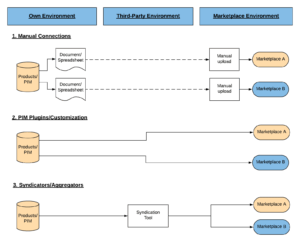
Manual connections
Most marketplaces still accept a manual exchange: CSV or Excel up and down, or edits in a web portal. You can start the same day, you stay flexible, and most systems you already run can export a file.
It gets expensive in labor. Some marketplaces do not allow manual changes. The work grows with the catalog, and so do the mistakes. Updating a listing only when you release a product sounds manageable until that same product also sits on a B2B site, a B2C shop, and a marketplace. Every change then has to be made in each of those places, and in the internal product database.
PIM plugins and customization
The PIM can own the marketplace connection. Product data stays close to the source, and the mapping can follow your catalog. Some PIM systems ship marketplace integrations. Others need heavy customization. Check that during selection.
You pay for that control in time, or in budget if a partner builds the connectors. These connections usually cover product information, sometimes stock and price. Order operations usually stay outside them.
Syndicators and aggregators
A syndicator sits between your catalog and the channels. ChannelEngine, ProductFlow, and Channable are built for that output step. You map internal product data to the places you sell, from Google Shopping to Amazon, and they keep the catalog current.
They absorb marketplace changes. Categories and hierarchies move often, and someone has to keep the feed working. Their rules can fill fields, combine fields, and run calculations, so you can hold the same margins across countries or publish different collections on different marketplaces.
They charge a fee, and a correct setup still takes real time. The setup earns that when stock updates and order operations run through the same connection.
Diagnostic
Do you actually need a PIM?
Run the complexity index before you budget software or hire an SI.
Budget
Model a first-pass TCO
Translate catalog shape into a three-year cost range in under ten minutes.